Help
Step-by-step guides with screenshots, answers to common questions and ways to reach support.
Last updated:
Getting started
- Sign up with a username, email and password, or in one click with Google.
- Confirm your email with the 6-digit code we send you.
- Practise on the demo account: every account gets $50,000 in virtual funds.
- Open the terminal, pick an asset and a trade duration, then press Buy or Sell.
- When you are ready, fund your real account in Finance. Identity verification is needed only for withdrawals. (fig. 1.1)
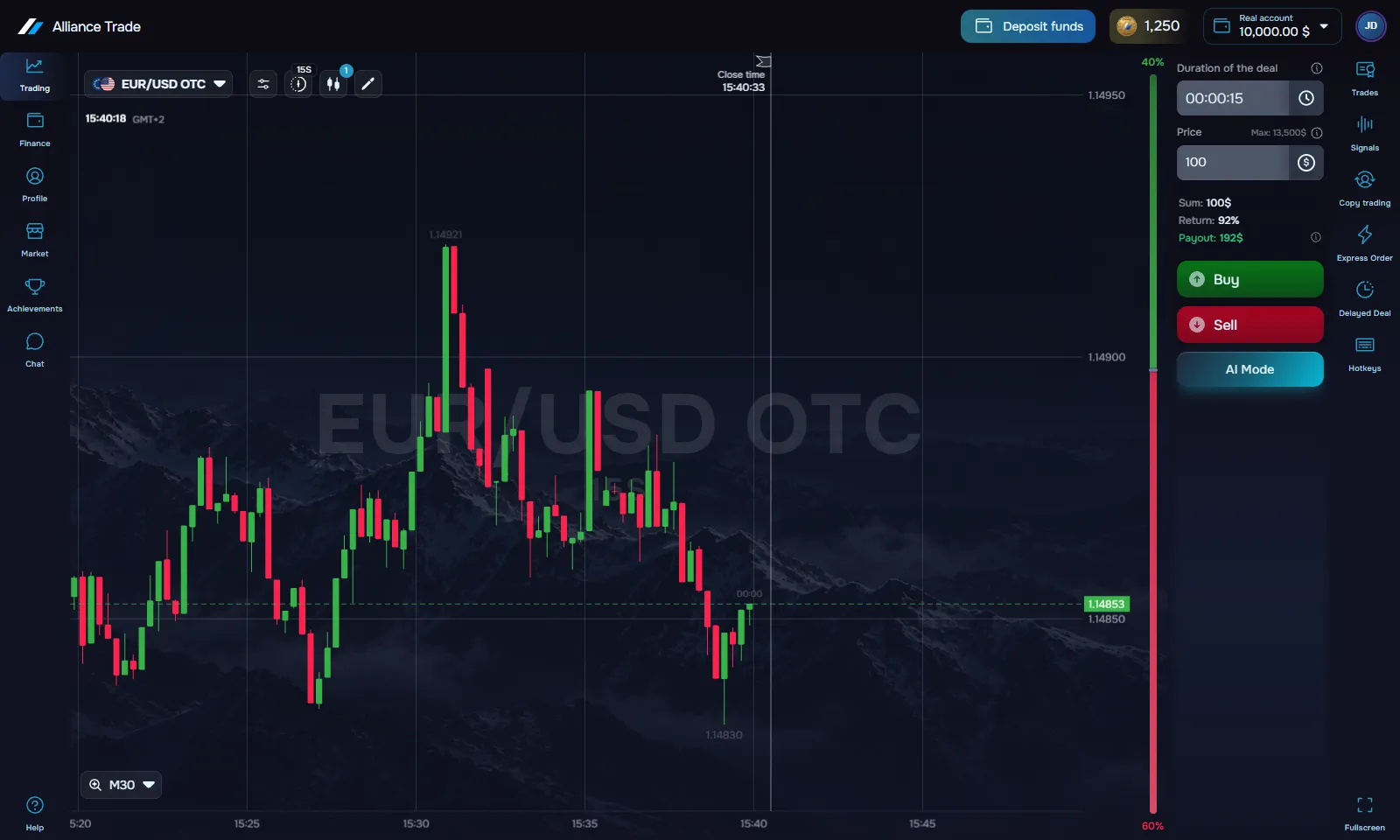
Sign up and sign in
To register, enter a username (3–32 Latin letters and digits), an email and a password, and accept the Terms of Service and Privacy Policy. The password must be at least 12 characters long and contain upper and lower case letters and a digit — Latin letters, digits and special characters only, without spaces.
You can also sign up or sign in with Google. If an account with the same email already exists, enter its password once to link Google sign-in — your password will not change.
Forgot your password? Click «Forgot password?» on the sign-in page, enter your email and the 6-digit code from the email to set a new password. If the email does not arrive within a few minutes, check your spam folder. (fig. 2.1)
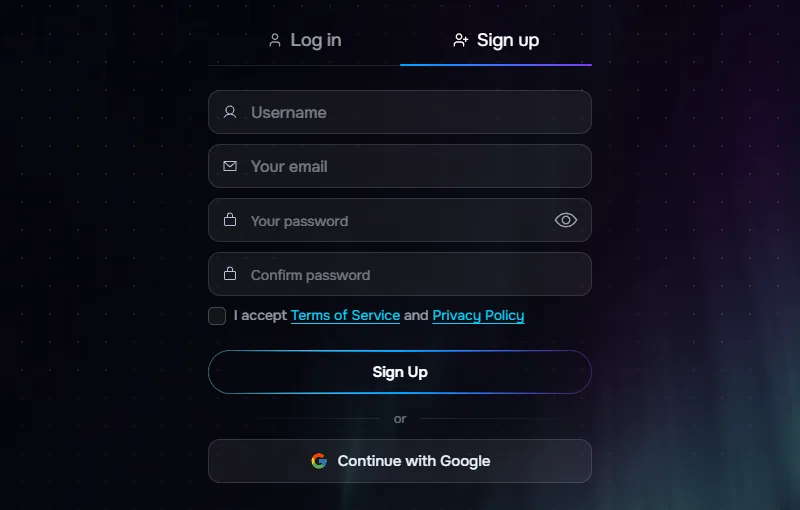
One user may have only one account. Creating additional accounts (multi-accounting) is grounds for a block.
Demo account
Every account has a demo account with $50,000 in virtual funds. Switch between the demo and real accounts in the account menu at the top right — the same menu lets you change the currency of your real account and top up the demo balance once it drops below $10,000.
Demo trading uses the same quotes and terminal as live trading. Close the required number of demo trades to raise your first-deposit bonus above 50% — progress is shown in the order panel. Demo results do not affect your real balance and do not guarantee future results. (fig. 3.1)
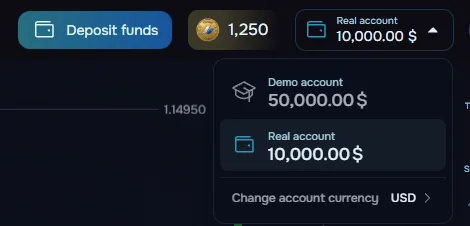
How to place a trade
Trades are opened from the order panel to the right of the chart. Next to it you will find AI Mode, signals, copy trading, express orders and delayed deals.
- Choose an asset in the top-left corner of the chart: currency pairs, cryptocurrencies, stocks, commodities or indices.
- Set the trade duration (from 5 seconds to 4 hours) or switch to an exact close time.
- Enter the amount — a fixed sum or a percentage of your balance. The maximum amount depends on your loyalty level.
- Check the payout: the return (up to 92%) and the total you will receive are shown before you open the trade.
- Press Buy if you expect the price to rise or Sell if you expect it to fall. The result is fixed when the timer ends. (fig. 4.1)
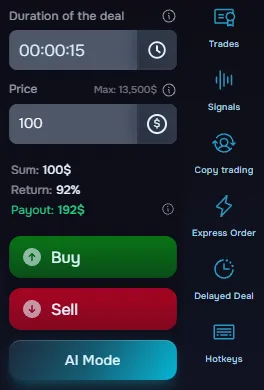
Check the amount, direction and time before pressing: the trade opens immediately and cannot be cancelled.
Deposits
Open Finance → Deposit or press «Deposit funds» in the top bar. Choose your country, the payment type (cards, cryptocurrencies, banks or e-payments) and a method — each one shows its minimum amount and processing time.
For crypto, send the exact amount shown and only via the specified network: funds are credited about 1–2 minutes after the network confirms the payment. For a bank transfer, upload the PDF receipt — your balance is credited after an operator checks the transfer. (fig. 5.1)
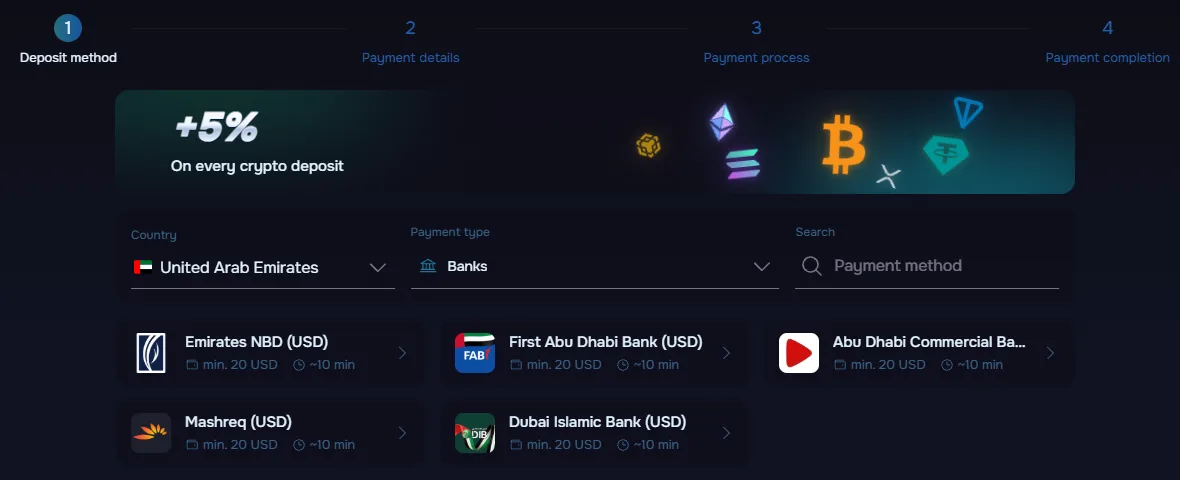
If you have an unfinished deposit, complete or cancel it before choosing another payment method.
Withdrawals
- Withdrawals are available after identity verification. The first and last name in your profile must match the owner of the card, account or wallet.
- Open Finance → Withdraw, choose a method and enter the amount and the wallet address or the card number / IBAN.
- For crypto, the blockchain fee is calculated after you enter the address and is deducted from the amount. XRP also requires a destination tag.
- If two-factor authentication is on for withdrawals, confirm the request with your password and an authenticator code.
- Requests are processed automatically within a few minutes, in some cases up to 3 business days. (fig. 6.1)
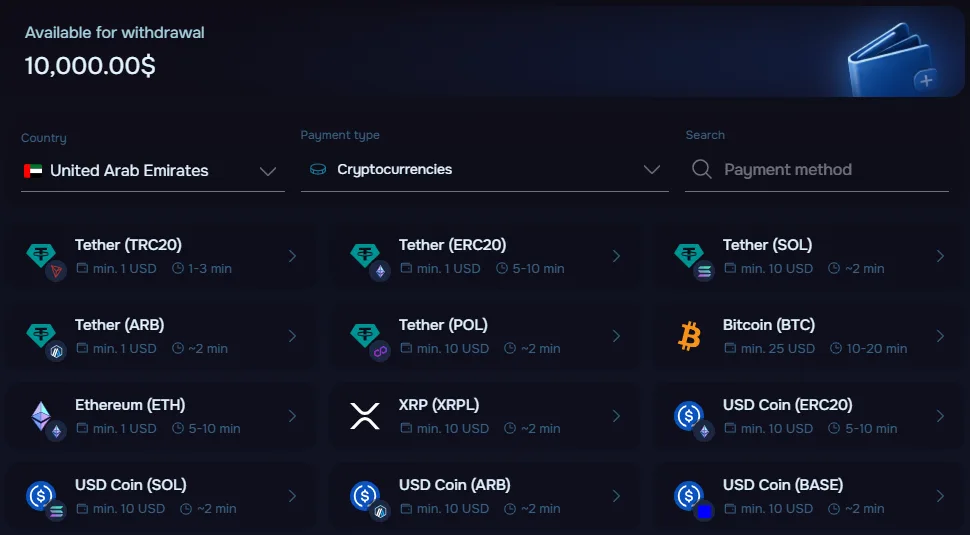
A request cannot be cancelled once it is created. Withdrawing before an active bonus is completed writes that bonus off your real balance.
Bonuses and promo codes
Bonuses are added to your real balance after a deposit. Each one shows its minimum deposit, maximum amount and required net trading turnover. You can cancel an active bonus at any time — its amount is then deducted from your real balance.
- First-deposit bonus: 50% by default, more for trades closed on the demo account.
- +5% on every crypto deposit. The crypto bonus can be withdrawn once your net trading turnover reaches 25 times its amount.
- Promo codes: available offers are in Finance → Promo codes, and you can enter your own code with «Add promo code».
- One bonus is chosen per deposit. On the first deposit you can combine the exchange bonus with one partner promo code. (fig. 7.1)

Cashback
Cashback returns part of your monthly trading loss. Buy it in the Market, activate it in your inventory and trade as usual.
On the 1st of every month, the set percentage of the previous month's loss is credited to your balance, up to the monthly limit. Status, terms and payout history are in Finance → Cashback. (fig. 8.1)
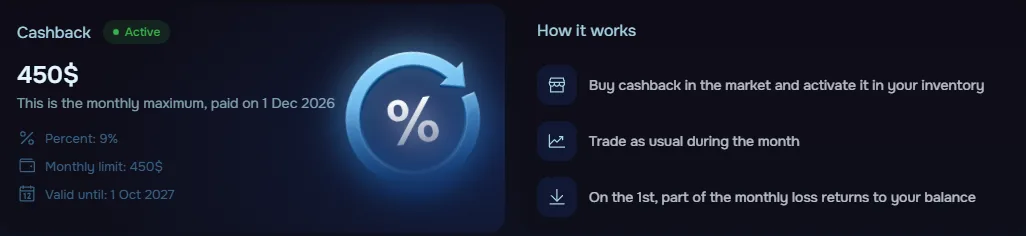
Verification (KYC)
Verification confirms that the account is used by its actual owner. It is required by anti-money-laundering rules and is needed before your first withdrawal.
- Fill in your first name, last name and date of birth in the profile (you must be 18 or older) and confirm your email.
- Press «Start identity verification» in the User status card and choose the country that issued your document.
- Take a photo of the document and a selfie in the secure Didit window — with your webcam or by continuing on your phone. (fig. 9.1)
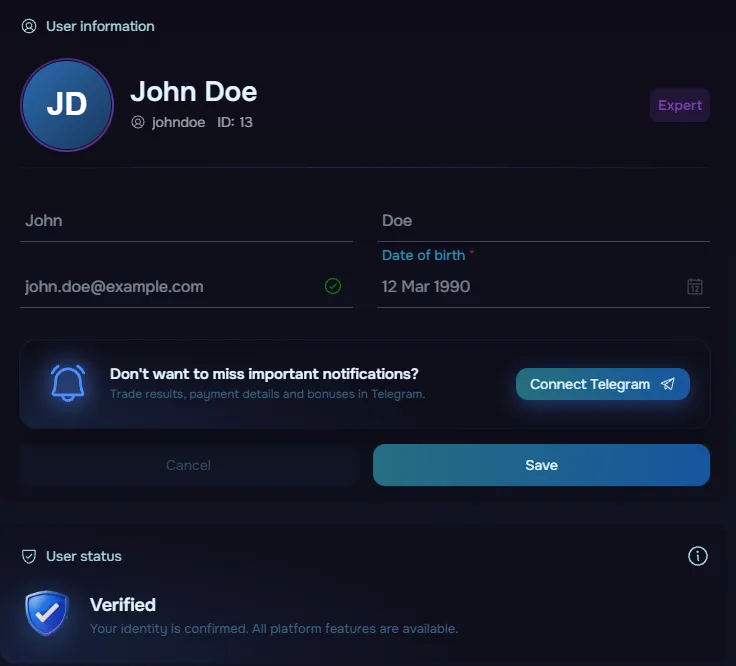
The check usually takes a few minutes. The result appears in the User status card.
Account security
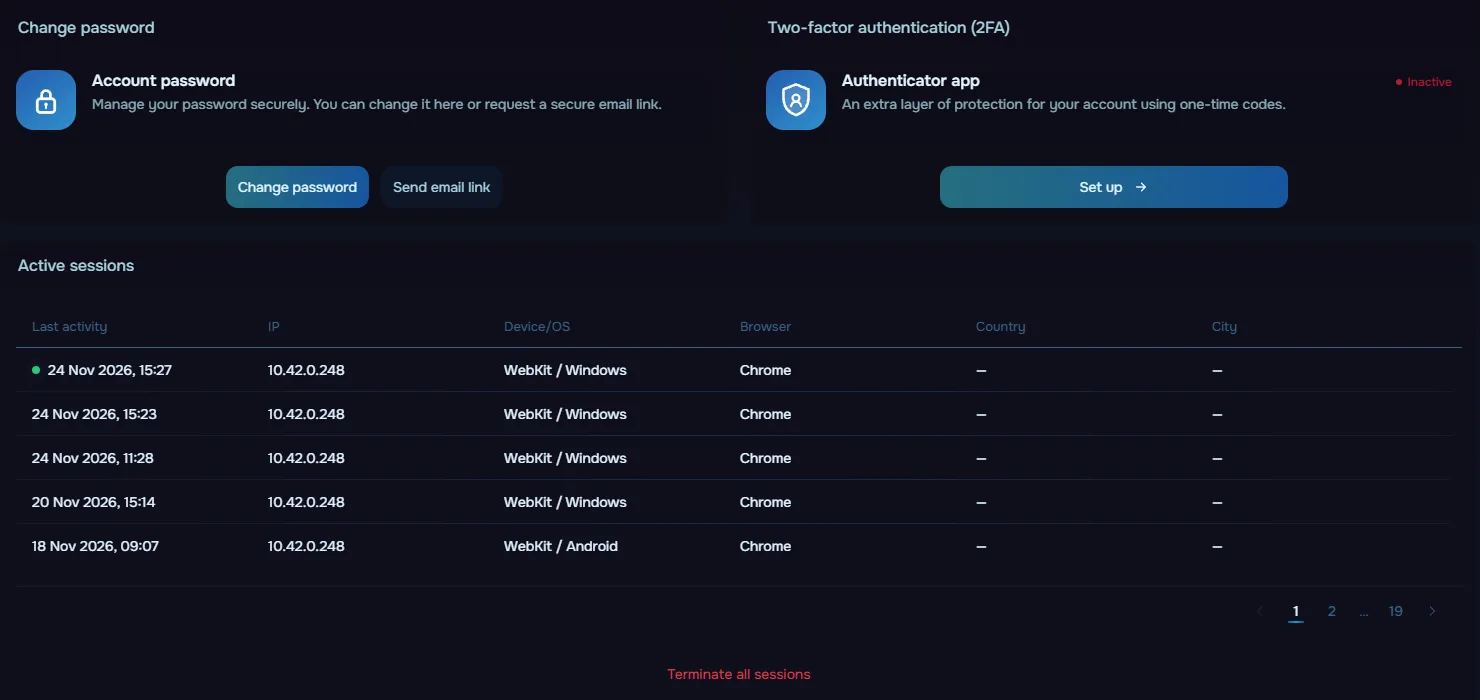
- Turn on two-factor authentication in Profile → Security: scan the QR code with an authenticator app and enter the 6-digit code.
- Additionally protect withdrawals with 2FA — the toggle is in the profile settings.
- You can also change your password there or request a secure link by email.
- Review active sessions and access history; if you see an unfamiliar device, end all sessions.
- Never share passwords, codes or card details — support never asks for them. Check the site address before signing in. (fig. 10.1)
Frequently asked questions
Yes. Every account gets $50,000 on the demo account, and once it drops below $10,000 you can top it up from the account menu.
The most common reasons: insufficient balance, an amount above the maximum for your level, the open-trade limit reached, a price change at the moment of opening, or a lost connection.
Usually a few minutes, in some cases up to 3 business days. After that, timing depends on the bank or the blockchain network.
Before your first withdrawal. You can trade and deposit without verification.
Yes: open the account menu at the top right and choose «Change account currency».
Crypto deposits are credited after network confirmation, usually within 1–2 minutes. For a bank transfer, make sure the PDF receipt is uploaded. If the funds still have not arrived, contact support with the payment ID.
Refresh the page. If that does not help, send support a screenshot and the time of the event.
Contacting support
The fastest channel is the chat: open «Chat» in the left menu or press the button below. It works around the clock and keeps your history. Describe the issue, when it happened and, if available, the trade or payment ID.
Questions about documents, payments or account restrictions are handled by a dedicated department — the reply may take a little longer.